Plagiarism Seach Sensitivity Settings

The sensitivity settings let you control exactly how the plagiarism engine compares your text against potential sources — from how long a matching passage must be, to how closely it needs to resemble the original.
warning Important Warning
The sensitivity settings directly affect the plagiarism detection results of all future scans. Changing these settings can cause:
- closeRelevant plagiarism to be missed — if settings are too strict
- closeA large number of false positives — if settings are too loose
Unless you have a specific reason to change them, we strongly recommend keeping the default values.
Overview
The Sensitivity tab in Settings controls how the plagiarism engine compares your submitted text against potential sources. The settings are divided into two sections:
- chevron_rightText Comparison Settings — control how matches within individual passages are detected
- chevron_rightPer-Source Sensitivity — control at what threshold an entire source is reported
All settings can be reset to their factory defaults at any time using the Reset to Default button.
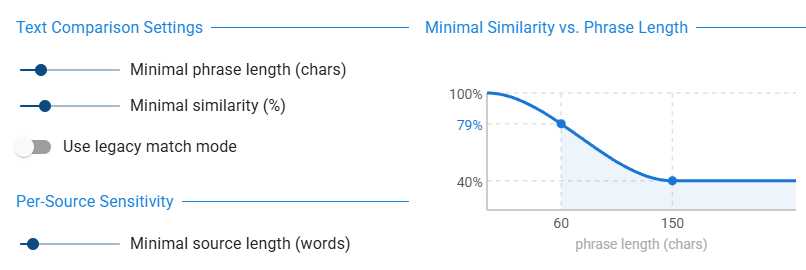
The screenshot below shows the Sensitivity tab as it appears in the Settings dialog. The following sections explain each control in detail.
Minimal Phrase Length
Slider range: 10 – 250 characters | Default: 50 characters
This setting defines the minimum length a suspicious passage must have before it is reported as a match.
- arrow_backA lower value (e.g. 10 chars) flags even very short matching passages — as few as 2–3 words
- arrow_forwardA higher value (e.g. 150 chars) reports only longer passages, roughly a full sentence or more
Practical Guidance
- check_circleFor academic papers, the default of 50 characters (approx. 6–10 words) works well for most cases
- check_circleGetting too many “noise” matches from short common phrases? Try increasing to 80–100
- check_circleChecking very short texts or want to catch even brief verbatim passages? Lower to 20–30
Minimal Similarity (%)
Slider range: 20 – 100 % | Default: 40 %
This is the most important setting for controlling how strictly the engine matches text. It defines the minimum proportion of matching words that a suspicious passage must contain to be reported.
- arrow_forward100 % — only word-for-word exact matches are accepted
- arrow_forwardLower values — paraphrased, reordered, or slightly altered text is also flagged
How Similarity Is Calculated
Within a detected passage, the engine counts matching words (words appearing in both texts, with minor spelling variations tolerated) and divides them by the total number of words in the passage.
Example: A passage of 30 words where 18 match the source = 60 % similarity.
The Adaptive Similarity Threshold
The similarity threshold does not apply as a fixed value for all passages equally. For short passages, the required similarity is automatically raised toward 100 %, because very short passages that look similar are more likely coincidental. The threshold only drops to your configured minimum for passages of about 150 characters or longer.
This adaptive behavior is visualized live in the sensitivity diagram on the right side of the Sensitivity tab — the diagram updates instantly as you move the sliders.
Practical Guidance
Setting Meaning Use when… 40 % (default) Catches paraphrased text and reordered sentences Most academic use cases 60–70 % Only flags passages where the majority of words match Too many paraphrase-style false alarms with default 100 % Strict word-for-word matching only You want to detect verbatim copying only
Use Legacy Match Mode
Switch (on/off) | Default: Off
When enabled, this switch activates the Legacy Match Mode, an older matching algorithm that predates the current similarity-based approach.
In legacy mode:
- arrow_forwardThe similarity slider is disabled — similarity is not evaluated at all
- arrow_forwardEvery passage where words match sequentially is reported, regardless of how many non-matching words appear between them
- arrow_forwardThe minimum phrase length is fixed at 20 characters, regardless of the slider setting
- arrow_forwardThe sensitivity diagram is hidden — it does not apply in this mode
warning Legacy Mode Is Not Recommended
Legacy Match Mode was the original matching logic and tends to produce more false positives, particularly in texts that share common academic vocabulary. It is retained for backwards compatibility only — for example, to re-run old scans under identical conditions for direct comparison with previous results.
Minimal Source Length
Slider range: 10 – 50 words | Default: 15 words
This setting controls the minimum total number of plagiarised words a source must contribute before it appears in your report at all.
- arrow_backA lower value (e.g. 10 words) — sources with just a few matching words are still listed
- arrow_forwardA higher value (e.g. 30–50 words) — sources that match only briefly are filtered out entirely
This acts as a final gating filter applied after all individual passages have been detected. Even if a source contains multiple small matching passages, it only appears in the report if the total word count of all its matches meets this minimum.
Practical Guidance
- check_circleReceiving many sources that contribute only a handful of matching words? Increase to 20–30
- check_circleWorking with short texts where even a small match may be significant? Decrease to 10–12
The Sensitivity Diagram
The chart on the right side of the Sensitivity tab provides a live visualization of your current settings. It shows the relationship between phrase length (horizontal axis) and the required minimum similarity (vertical axis) for a passage to be accepted as a match.
Reading the Diagram
| Element | What it means |
|---|---|
| Blue S-curve | The required similarity at each phrase length. Slopes smoothly from 100 % for very short phrases down to your configured minimum for longer ones. |
| Shaded area | The zone of accepted matches. Any passage whose phrase length and similarity fall within this area is flagged as suspicious. |
| Left dotted line | Your configured Minimal Phrase Length. Passages shorter than this are never reported. |
| Right dotted line (150) | The reference point at which your configured Minimal Similarity fully applies. |
| Y-axis labels | 100 % at the top; your configured minimal similarity at the flat part of the curve. |
| Blue dot on left line | The required similarity exactly at your configured minimum phrase length. |
Example — Default Settings (50 chars, 40 %)
| Phrase length | Required similarity | Result |
|---|---|---|
| 30 characters | ~90 % | Only near-identical short passages flagged |
| 50 characters | ~75 % | Minimum phrase length reached; moderate similarity required |
| 100 characters | ~52 % | About half the words must match |
| 150 characters or more | 40 % | Your configured minimum applies — paraphrasing is detected |
- arrow_forwardMoving the Minimal Phrase Length slider shifts the left boundary of the shaded zone
- arrow_forwardMoving the Minimal Similarity slider raises or lowers the flat right portion of the curve
Presets and Reset
Reset to Default
Clicking Reset to Default restores all sensitivity values to their factory defaults:
| Setting | Default Value |
|---|---|
| Minimal Phrase Length | 50 characters |
| Minimal Similarity | 40 % |
| Legacy Match Mode | Off |
| Minimal Source Length | 15 words |
When Do Settings Apply?
Settings take effect for all new plagiarism scans started after saving. They do not retroactively change the results of already-completed scans. Each completed scan stores its own settings snapshot, which is displayed in the report for reference.
Quick Reference
| Setting | More sensitive (detects more) | More strict (reports less) |
|---|---|---|
| Minimal Phrase Length | Lower value | Higher value |
| Minimal Similarity | Lower value | Higher value |
| Minimal Source Length | Lower value | Higher value |
| Legacy Match Mode | On (no similarity filter at all) | — |